Music
$79one-time
Streaming, distribution, and sync deals.
- 1 Seat
- Music industry
- Per-stream + per-unit calc
- Email support
Pay with
 My Royalty Tracker
Now live — on Etsy and direct
The only spreadsheet-based royalty tool that auto-imports your streaming reports — Spotify, Apple Music, YouTube, DistroKid, TuneCore, Bandcamp. No copy-paste. No bookkeeper. No SaaS subscription. A workbook you own that knows what you're owed.
Paid. Tracked. Reconciled.
NEW Already have your workbook? Drop your CSVs →
Indie artists, small CPG brands, single-creator influencers, solo licensors. You don't need a $40k/yr SaaS — you need a spreadsheet that actually does the math right.
Drop in sales data, get a clean royalty statement per period per deal. No more "wait, did I get paid for Q2?"
Drop CSVs from Spotify, Apple Music, YouTube, DistroKid, TuneCore, or Bandcamp. The Upload Center auto-detects each platform and appends rows to your workbook — no copy-paste.
Every transaction, calculation, and payment in one workbook. Hand it to your CPA or auditor as-is.
Track licensors, licensees, and distributors in one place — with industry, contact, and country tagging.
Multi-tier royalty schedules per deal. Rates can change by year, volume, or window — the engine picks the right one automatically.
Drop platform CSVs from Spotify, Apple Music, YouTube, DistroKid, TuneCore, or Bandcamp - we auto-detect, normalize, and append rows to your tracker. No copy-paste.
Try the Upload Tool →Joins Sales to Deals. Applies the right rate, deducts adjustments, computes Net Royalty and MG variance per row.
One statement row per period per deal. Payment aging tracker shows what's paid, owed, or overdue.
Headline numbers — total royalties earned, outstanding payments, MG status — at a glance for every deal.
From purchase to first royalty statement in under an hour.
Pick the Edition that matches your industry. We email you a personalized, watermarked workbook within minutes.
Enter counterparties and contract terms (tiers, rates, MG, dates). Drop in your historical sales/usage data.
Statements and payment aging populate automatically. Hand to your CPA, send to your counterparties, or just sleep better.
Buy the Edition that fits your industry. Bug fixes and minor updates included; major versions may require a separate purchase.
$79one-time
Streaming, distribution, and sync deals.
Pay with
$79one-time
Affiliate revshare, branded SKUs, sponsored content.
Pay with
$99one-time
Patent, trademark, books, franchise royalties.
Pay with
$149one-time
Brand licensing, retail, club, DTC channels.
Pay with
$249one-time
Every industry. Best value if you license across more than one vertical.
Pay with
$349one-time
Everything in All-Access, plus full business management tooling.
Pay with
Stripe, Etsy, and PayPal checkout are being set up. Until they're live, every payment button opens an order email so we can send your file manually within 24 hours.
A look at the actual tabs you'll use to track royalties — counterparties, tiered deal terms, the calculation engine, statements, payment aging, and a live KPI dashboard. Every tab is wired together so the moment you drop in a sale, the royalty, statement, and payment all flow through.
Note: Screenshots below are from a sample workbook with fictional counterparties and figures. Your licensed copy ships with everything blank, ready for your real data.
Pick your Edition →Already have your workbook? Upload your CSVs and we'll auto-fill the streaming data.
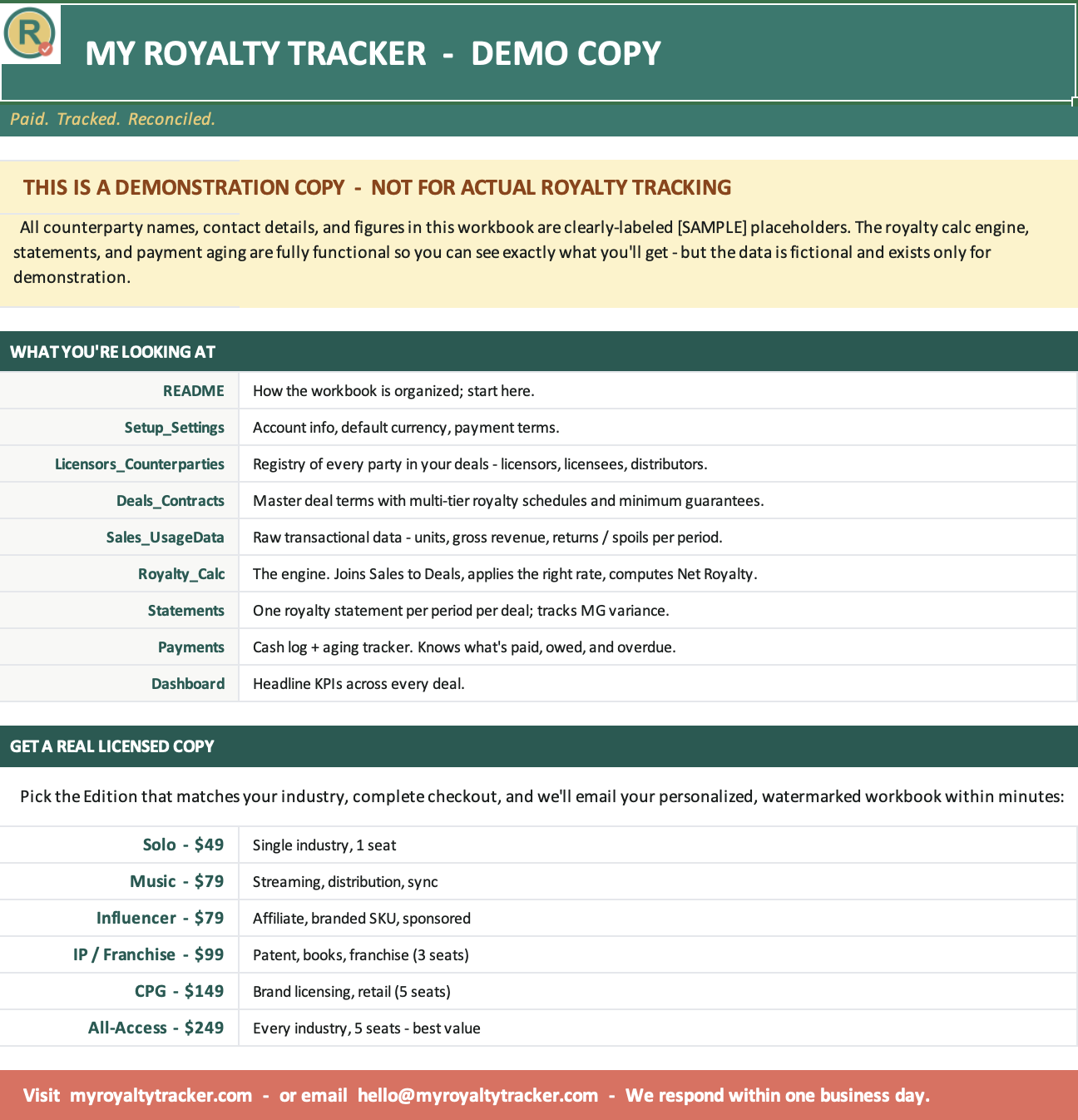
A guided overview of every tab and how they fit together — so you're productive in minutes, not hours.
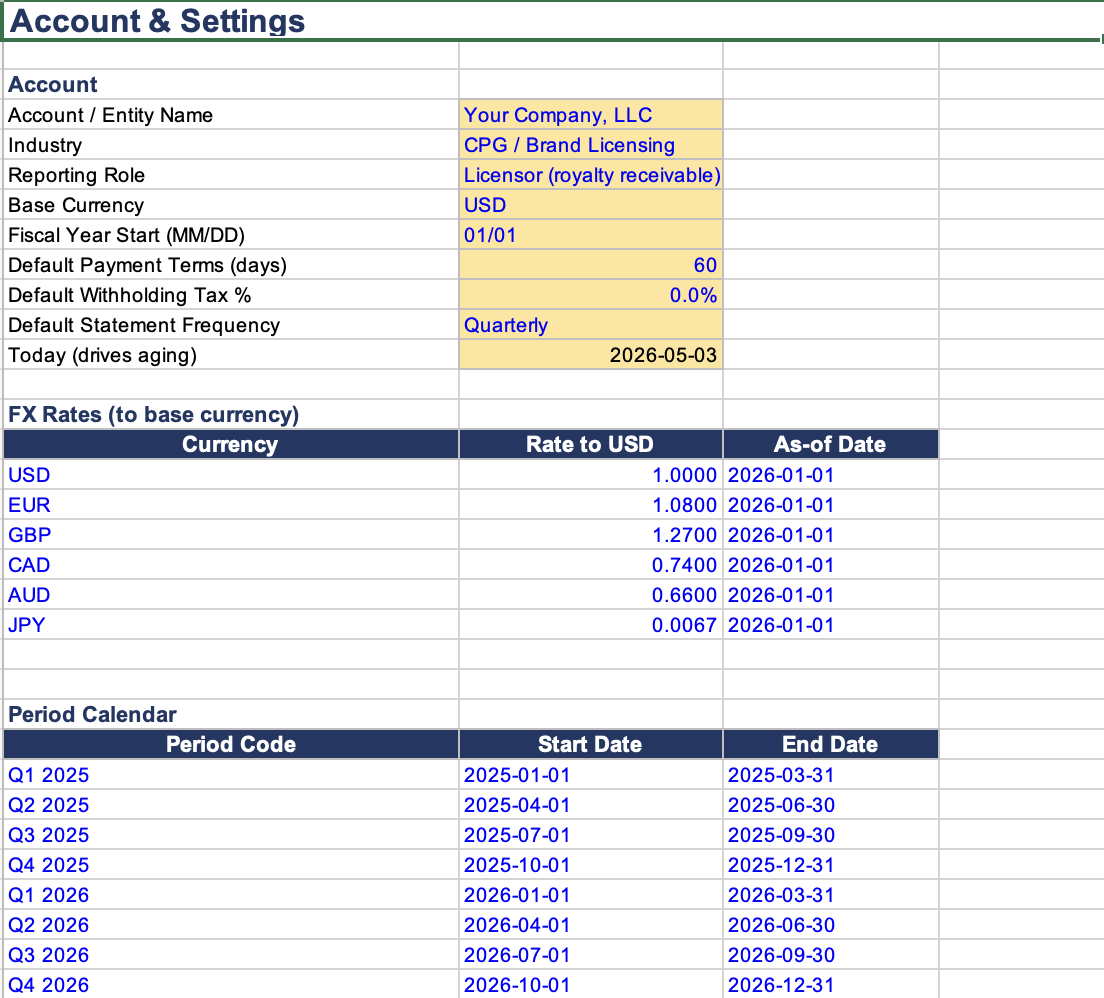
Account, fiscal year, base currency with FX rates, payment terms, and the period calendar. Set it once, every other tab inherits.
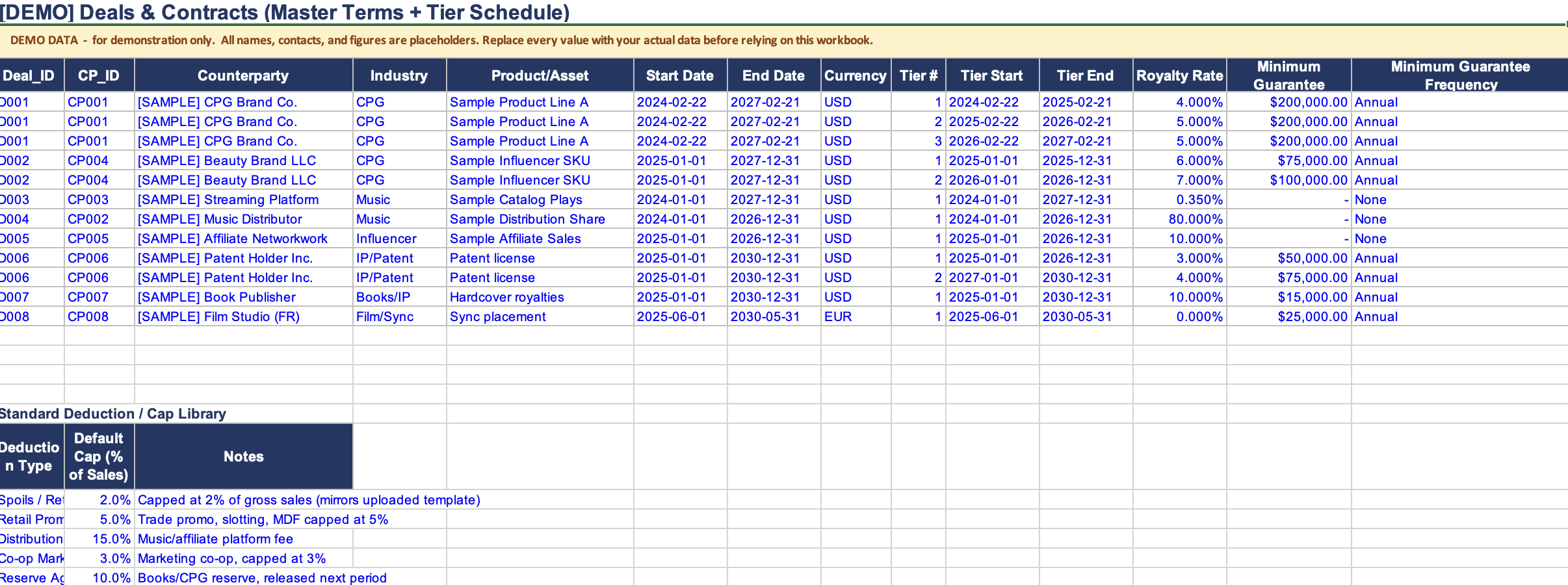
Multi-tier royalty schedules, minimum guarantees, currency, and a deduction library — all on one screen, per deal.
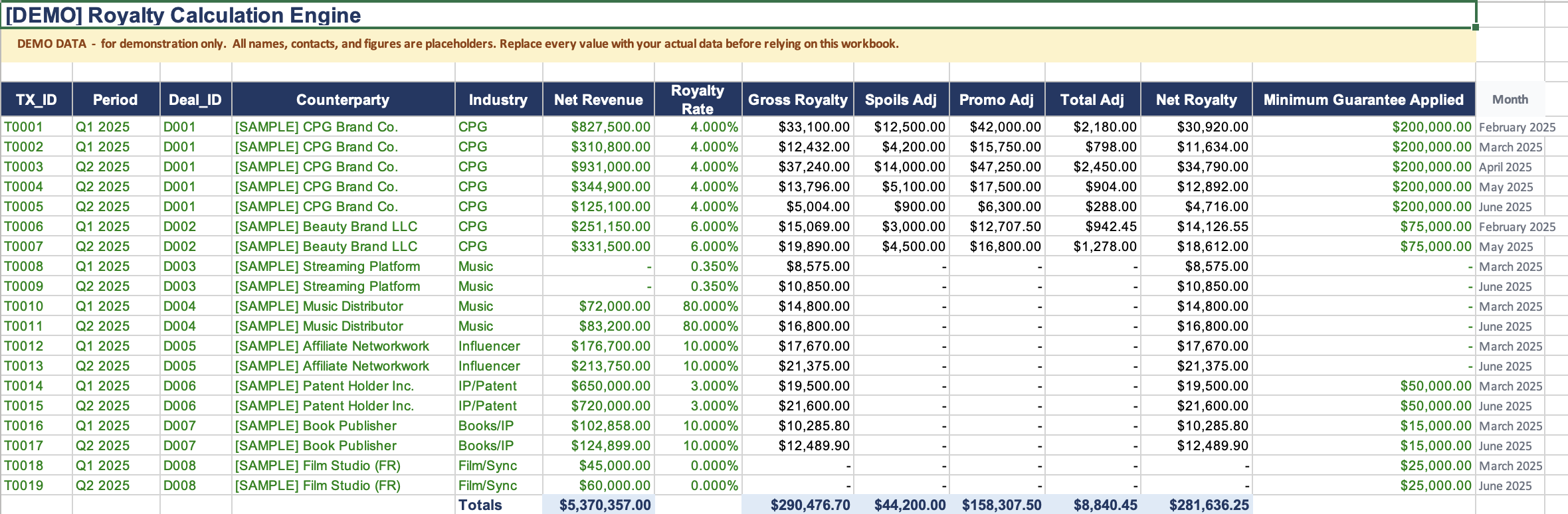
Joins sales to deals, applies the right rate, deducts spoils & promo adjustments, and surfaces the Minimum Guarantee — line by line.
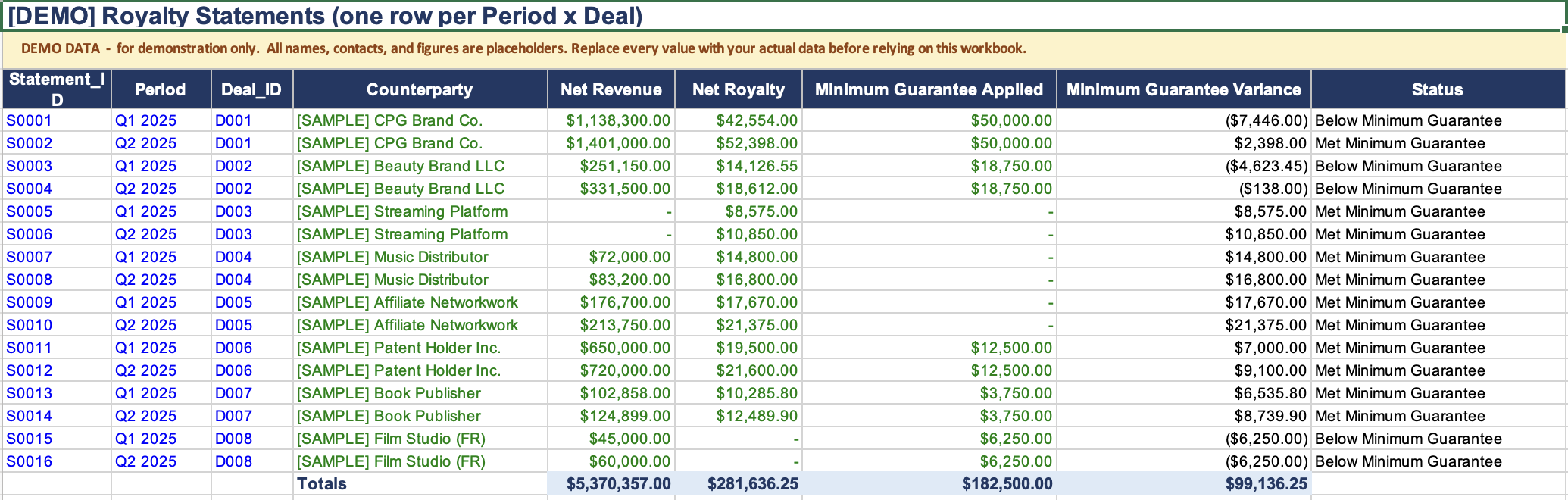
One row per Period × Deal with Net Revenue, Net Royalty, MG variance, and a Met/Below status flag — ready to send.

Net royalty rolled up monthly across Music, CPG, Influencer, IP, Books, Film/Sync — auto-updates as Royalty_Calc grows.

Royalty revenue auto-pulled from Monthly_Royalties. Marketing & Ads auto-pulled from Acquisition_Costs. YTD KPIs at the top.

Campaign-level spend, impressions, clicks, streams driven, revenue attributed — auto-computes CPM, CPV, CPC, ROAS, and payback in months.
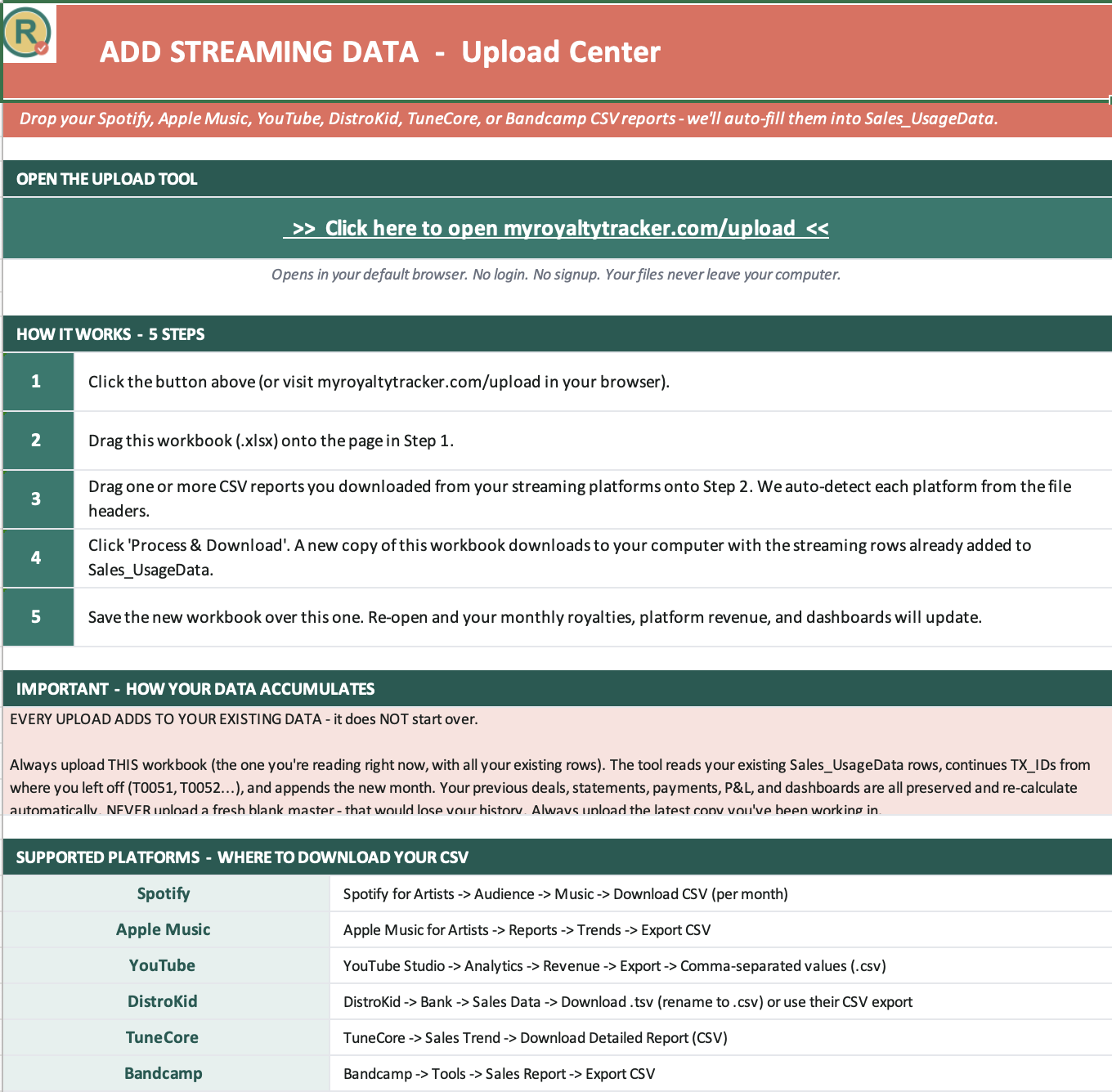
Drop platform CSVs from Spotify, Apple Music, YouTube, DistroKid, TuneCore, or Bandcamp — auto-detected and appended to Sales_UsageData.

Pre-built deal-type examples for Music, CPG, Influencer, IP/Franchise, and Film/Sync — color conventions and tab map included.
We respond within one business day.
From the blog
Practical pieces for rights holders who want to know exactly how the math works.
Spotify hands you 18 columns. Five drive your royalty math — the rest is metadata. Here's which to wire to your tracker, and why ISRC beats track name every time.
Read post →A worked example with a real-shaped statement. What rate-tier mismatches look like, where MG variance hides, and the three checks that catch 80% of issues.
Read post →The FX-rate gotchas that bite at quarter-close, when to lock periods, and why per-period rates beat a single annual average.
Read post →